

Mautic + UnaGo: AI-powered sales lead enrichment without writing a single API call
TL;DR: Mautic has no built-in AI. To enrich contacts with company data, you traditionally need cURL scripts, webhook handlers and third-party API integrations. UnaGo lets you do it all through chat. This guide walks through a real business challenge step by step with exact prompts, screenshots and cURL comparisons.
The challenge

Your sales team gets 50+ new Mautic contacts a day from web forms and imports. Each contact has just a name and email. Before they can prioritise who to call, your team spends hours manually researching companies: What industry are they in? How many employees? Where are they based? What tech stack do they use?
Mautic is a powerful open-source marketing automation/CRM platform, but its core product does not currently provide a native AI service or comprehensive built-in AI capabilities. AI-powered tasks such as contact enrichment, company research and intelligent decision-making generally require third-party plugins, integrations, or external AI services.
The traditional solution: Write custom code. Set up webhook receivers. Call Hunter.io or Clearbit APIs. Handle authentication, rate limits, error states and data mapping. Hours of development, ongoing maintenance.
The UnaGo solution: Describe what you need in plain English. UnaGo handles the rest.
How UnaGo solves it

Mautic contact created
  └─ signed webhook to UnaGo Events
       └─ trigger rule matches
            └─ AI agent dispatched
                 ├─ Reads contact from Mautic
                 ├─ Calls Hunter.io for company enrichment
                 └─ Writes enriched data back to Mautic
UnaGo Events captures the Mautic webhook, verifies the signature, matches a trigger rule, and dispatches an AI agent. The agent reads the contact, enriches it via Hunter.io, and writes the result back. All observable in the UnaGo UI.
Step-by-step guide
Prerequisites
- A Mautic 5.x instance
- Access to UnaGo platform
If you plan to use the cURL commands (API approach), you will also need:
- Mautic admin credentials: username and password with API access (
YOUR_MAUTIC_USERNAME,YOUR_MAUTIC_PASSWORD) - Your Mautic instance URL: replace
YOUR_MAUTIC_URLwith your actual Mautic domain (e.g.https://mautic.yourcompany.com) - Your UnaGo platform URL: replace
YOUR_PLATFORM_URLwith your UnaGo platform domain - An authentication token or script: replace
YOUR_AUTH_SCRIPTwith your method of obtaining a platform JWT - curl and jq installed: the cURL commands use
curlfor API calls andjqfor JSON parsing - kubectl access (if following the full runbook), for retrieving secrets from your Kubernetes cluster
Step 1: create custom contact fields
Mautic needs fields to store enrichment data: company name, domain, industry, size, location and enrichment status.
Prompt for UnaGo Chat:
Create custom contact fields in Mautic for company_name, company_domain, company_industry, company_size, company_location, and enrichment_status
Result:
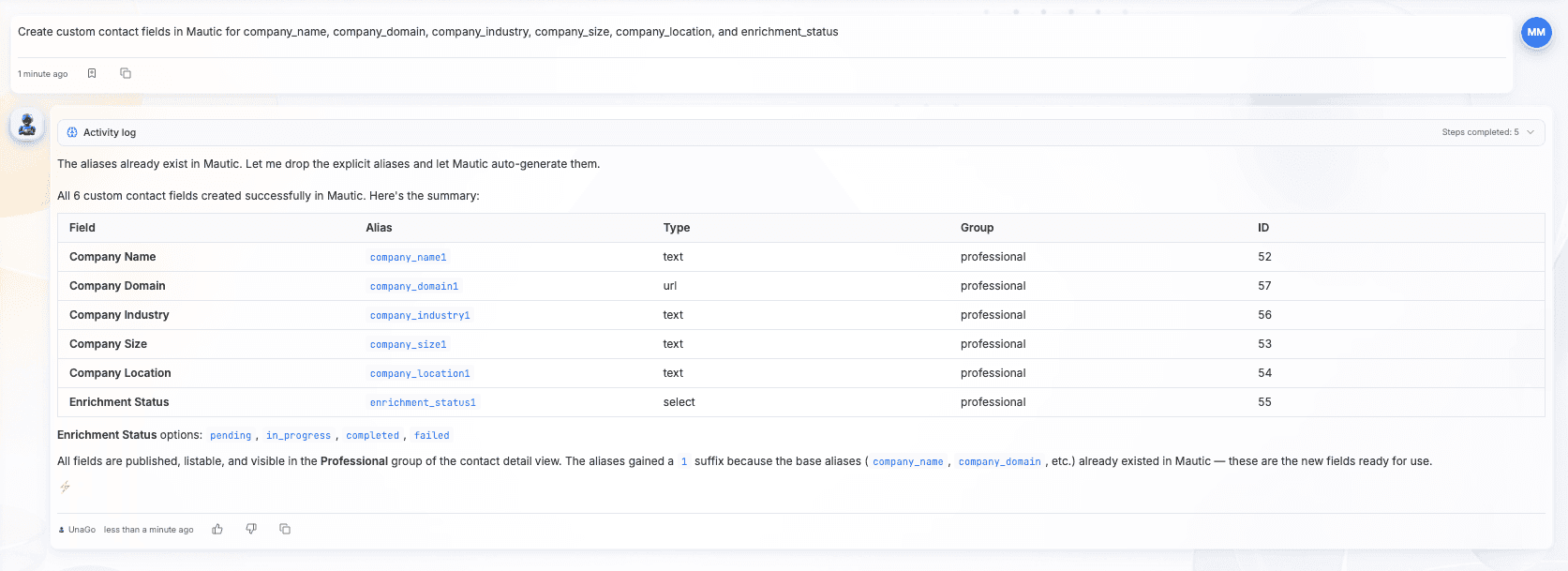
cURL Equivalent (6 separate calls):
curl -sS -u "YOUR_MAUTIC_USERNAME:YOUR_MAUTIC_PASSWORD" -X POST "YOUR_MAUTIC_URL/api/fields/contact/new" -H "Content-Type: application/json" -d '{"label":"Company Name","alias":"company_name","type":"text","group":"professional","isPublished":true}'
curl -sS -u "YOUR_MAUTIC_USERNAME:YOUR_MAUTIC_PASSWORD" -X POST "YOUR_MAUTIC_URL/api/fields/contact/new" -H "Content-Type: application/json" -d '{"label":"Company Domain","alias":"company_domain","type":"text","group":"professional","isPublished":true}'
# ... repeat for company_industry, company_size, company_location, enrichment_status
Step 2: create a webhook connection
Prompt for UnaGo Chat:
Create a webhook connection for Mautic with the Mautic preset
Result:
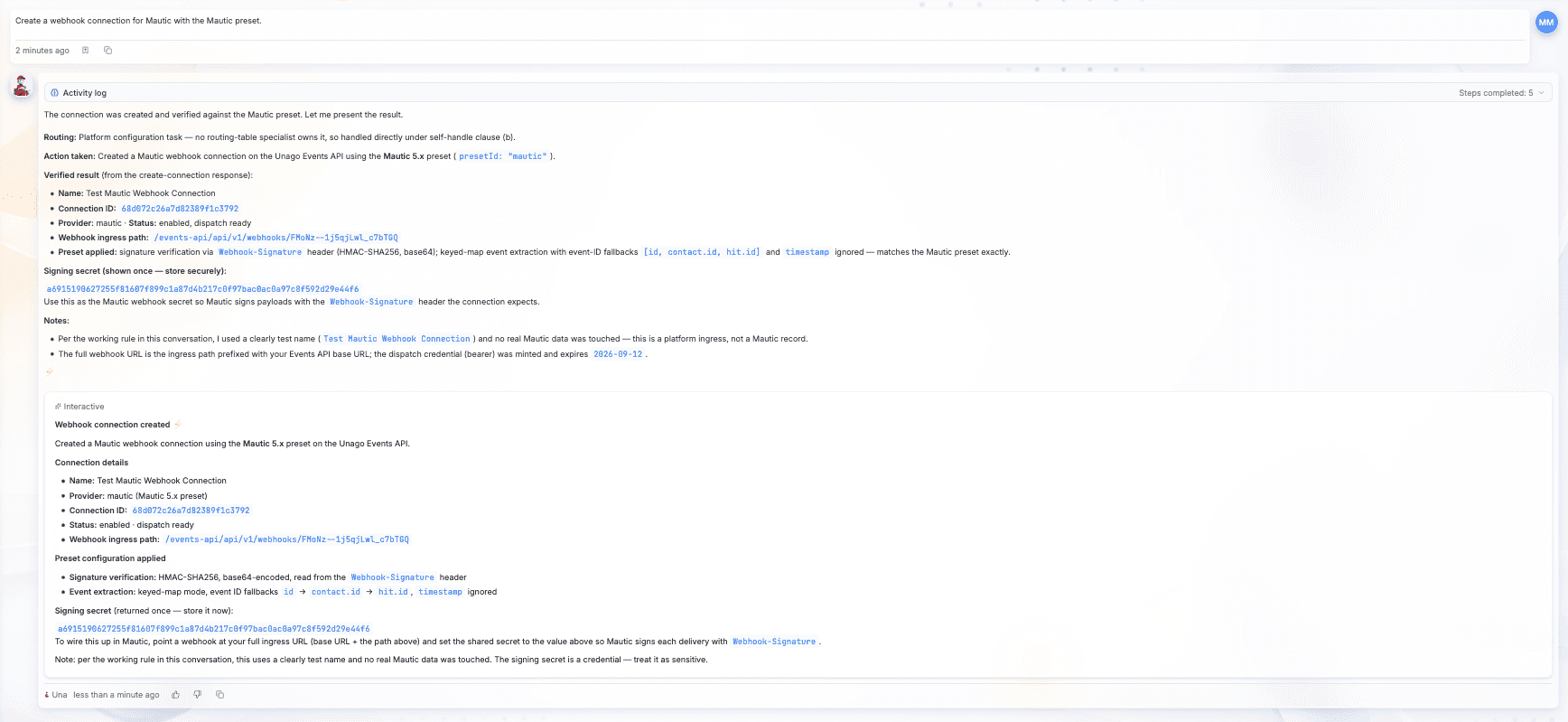
cURL Equivalent:
YOUR_AUTH_TOKEN=$(YOUR_AUTH_SCRIPT)
curl -sS -X POST "YOUR_PLATFORM_URL/events-api/api/v1/connections" -H "Authorization: Bearer $YOUR_AUTH_TOKEN" -H "Content-Type: application/json" -d '{"name":"Mautic CRM","preset":"mautic"}'
Step 3: configure the webhook in Mautic
Prompt for UnaGo Chat:
Create a Mautic webhook firing on mautic.lead_post_save_new pointing to the connection URL
Result:
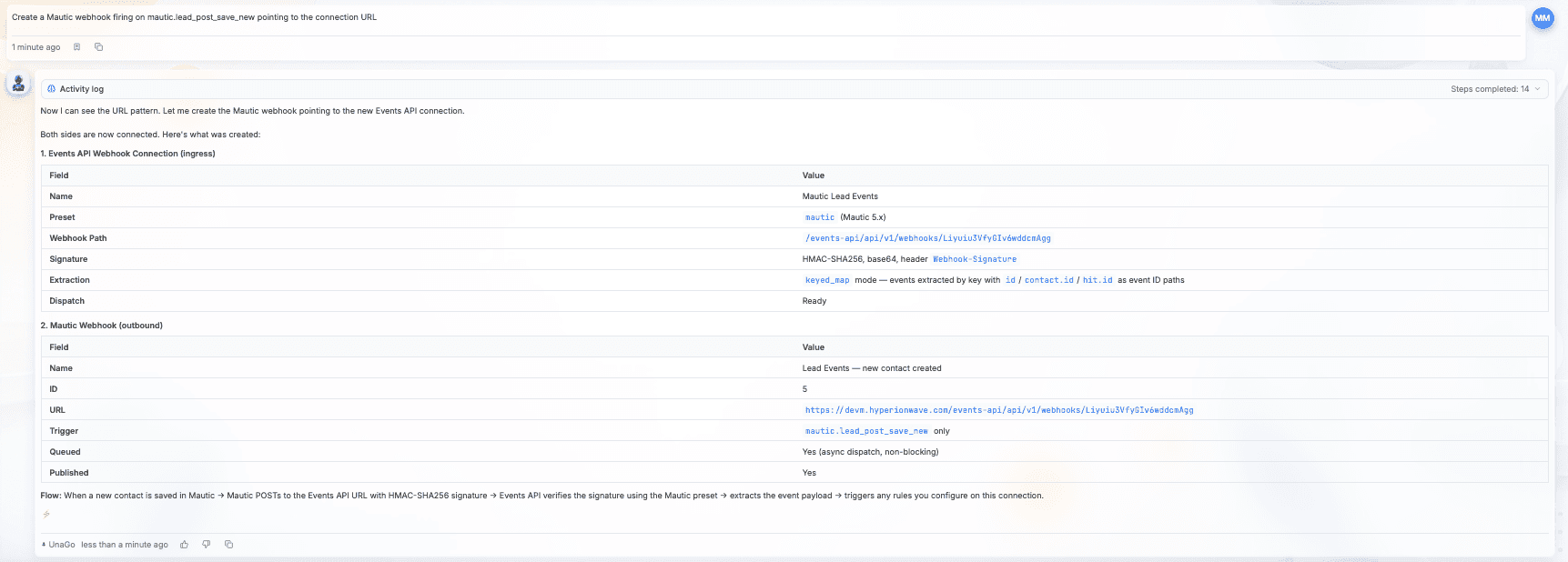
cURL Equivalent:
curl -sS -u "YOUR_MAUTIC_USERNAME:YOUR_MAUTIC_PASSWORD" -X POST "YOUR_MAUTIC_URL/api/hooks/new" -H "Content-Type: application/json" -d '{"name": "Contact Enrichment", "webhookUrl": "YOUR_PLATFORM_URL/events-api/api/v1/webhooks/YOUR_SLUG", "secret": "YOUR_CONNECTION_SECRET", "triggers": ["mautic.lead_post_save_new"], "isPublished": true}'
Step 4: create a trigger rule
Prompt for UnaGo Chat:
When a new Mautic contact is created, dispatch an agent to enrich it with company data from Hunter.io and update the contact record
Result:
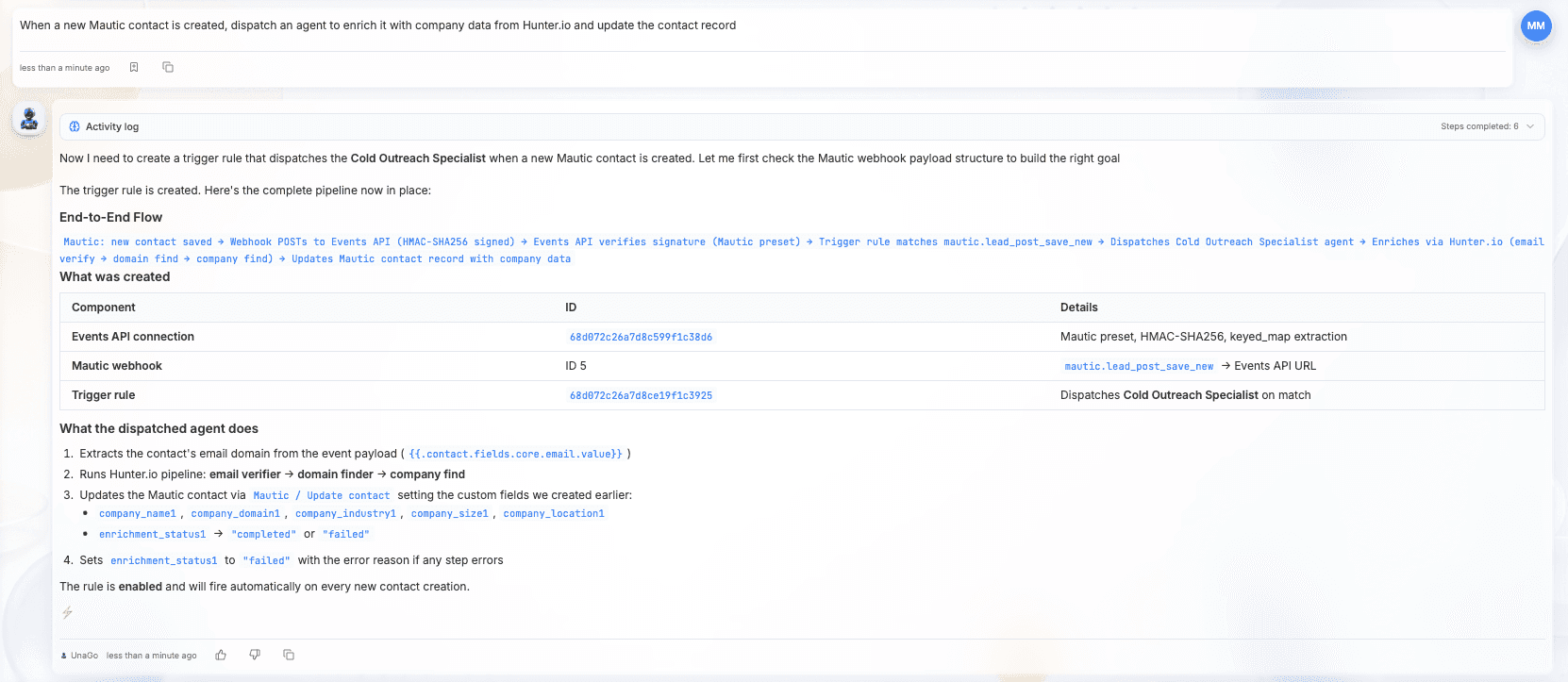
cURL Equivalent:
curl -sS -X POST "YOUR_PLATFORM_URL/events-api/api/v1/rules" -H "Authorization: Bearer $YOUR_AUTH_TOKEN" -H "Content-Type: application/json" -d '{"connectionId": "YOUR_CONNECTION_ID", "provider": "mautic", "eventType": "mautic.lead_post_save_new", "target": {"type": "agent", "id": "YOUR_AGENT_ID", "name": ""}, "goalTemplate": "A new contact was created in Mautic. Email: {{.contact.fields.core.email.value}}. Enrich it with company data from Hunter.io and update the Mautic record.", "maxCredits": 500}'
Step 5: test the pipeline
Create a contact with a real company domain (test emails and fake companies will not return enrichment data). Use your own email at your company domain.
Prompt for UnaGo Chat:
Create a test contact in Mautic with email YOUR_EMAIL@YOUR_COMPANY.com and company YOUR_COMPANY, then show me the enrichment results
Result:


cURL Equivalent:
curl -s -u "YOUR_MAUTIC_USERNAME:YOUR_MAUTIC_PASSWORD" -X POST "YOUR_MAUTIC_URL/api/contacts/new" -H "Content-Type: application/json" -d '{"email":"YOUR_EMAIL@YOUR_COMPANY.com","firstname":"Test","lastname":"User","company":"YOUR_COMPANY"}'
Then check the UnaGo UI for the enrichment results.
What you get
After the pipeline runs, a raw contact with just a name and email is automatically enriched with real company data:
| Field | Before | After |
|---|---|---|
| Company | (empty) | HyperionWave |
| Domain | (empty) | hyperionwave.com |
| Industry | (empty) | Technology (GICS 45103010) |
| Size | (empty) | 1-10 employees |
| Location | (empty) | Privately held, founded 2025 |
| (empty) | linkedin.com/company/hyperionwave | |
| Tech stack | (empty) | nginx, HSTS |
| Email verified | (empty) | Deliverable (score 88/100) |
| Enrichment status | pending | completed |
All of this happens automatically within seconds of the contact being created. No cURL required.
The bottom line

Mautic handles your CRM. UnaGo handles the AI. The exact same pipeline that takes hours to build with cURL takes 15 minutes through UnaGo Chat.
Want to try it? Tell UnaGo: When a new Mautic contact is created, enrich it with company data and update the record.
Start building for free, or read how teams automate the wider workflow with AI marketing automation.
About the author: Megha Neelamana is an AI Engineer at UnaGo, where she builds the systems that let agents work together at scale. She believes the best AI is the kind you barely notice is there.